Getting started
Section Collection adds 65+ ready-made, responsive sections to the WordPress block editor: heroes, pricing tables, testimonials, FAQs, timelines and more. Each section is a native block, so there is no page builder to learn and nothing extra loads on pages that do not use it.
Requirements
- WordPress 6.2 or later, using the block editor.
- PHP 7.1 or later.
- Any standard theme. Block themes and classic themes both work.
Install the free plugin
Choose whichever method suits you. All three install the same plugin.
From your dashboard (recommended)
- In WordPress, go to Plugins, then Add New Plugin.
- Search for Section Collection.
- Click Install Now, then Activate.
Upload the zip file
- Download the plugin as a zip file.
- Go to Plugins, then Add New Plugin, then Upload Plugin.
- Choose
section-collection.zip, click Install Now, then Activate.
Manually, over FTP
- Unzip the plugin and upload the
section-collectionfolder to/wp-content/plugins/. - Activate it from the Plugins screen.
Install Pro
- Buy a plan from the pricing section. Your receipt email contains your license key and a download link for the Pro zip.
- If the free version is installed, deactivate it first. Your pages and sections are kept.
- Go to Plugins, then Add New Plugin, then Upload Plugin, and install the Pro zip.
- Activate it, then go to Section Collection, then Dashboard, and click Activate License.
- Paste your license key and confirm. The 15 Pro sections appear in the block inserter right away.
Add a section
- Open any page or post in the block editor.
- Click the + block inserter at the top left.
- Scroll to the Section Collection category, or type the section name in the search box, for example pricing.
- Click a section. It lands on the page fully designed, with sample content.
- Replace the sample text and images with your own, then click Publish or Update.
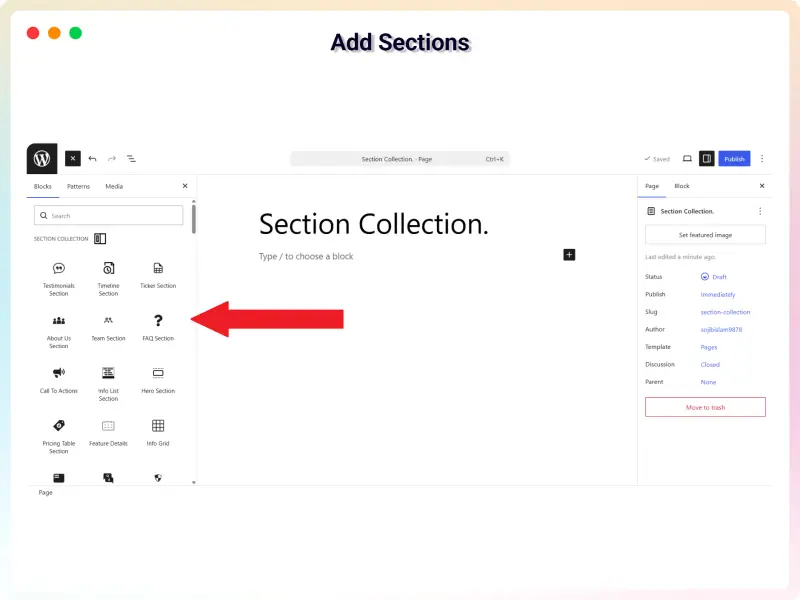
Customize a section
Select the section on the page. Its settings open in the sidebar on the right. If the sidebar is hidden, click the Settings icon at the top right of the editor.
- General controls the layout and content: columns, items, what to show or hide, and links.
- Style controls the look: colors, typography, spacing, borders and hover effects.
- Theme switches the whole section to another ready-made design while keeping your content. Most sections include several themes.
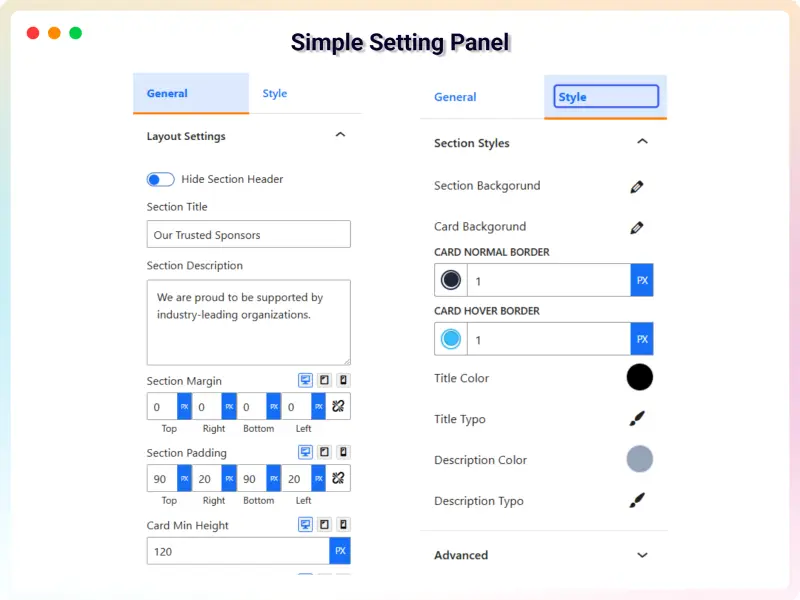
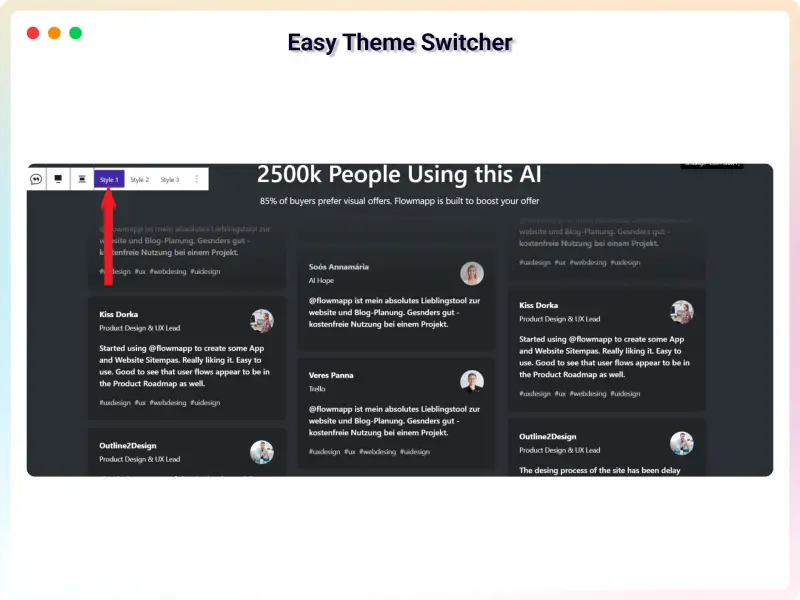
Template Library
The Template Library adds complete, pre-built layouts in one click. Open the Template Library in the block editor, browse All Templates, and click one to import it into the page.
Templates are built with the free bBlocks plugin. If it is missing, the library offers Install bBlocks & Import or Activate bBlocks & Import, which does it for you. Only an administrator can install or activate plugins.
Turn sections on or off
Go to Section Collection, then Dashboard. The blocks screen lists every section with a switch. Turn off any section you do not use to keep the block inserter tidy. Deactivate All turns them all off at once, and you can then re-enable just the ones you need.
Turning a section off does not delete content, but pages that already use it will stop showing that section until you turn it back on.
Manage your Pro license
- Activate: Section Collection, then Dashboard, then Activate License. Paste the key from your receipt email.
- Move to another site: choose Deactivate license on the old site, then activate the same key on the new one. A single-site license works on one site at a time.
- Change the key: choose Change license and paste the new key, for example after upgrading to unlimited sites.
- When a yearly license ends: your pages keep working. Updates and support pause until you renew.
Section reference
All 65 section types, with a live demo and a video walkthrough where available. Search the full library with previews on the All sections page.
| Section | Plan | Category | Demo | Video |
|---|---|---|---|---|
| Hero Section | Free | Hero & CTA | Live demo of Hero Section | |
| Call To Action | Free | Hero & CTA | Live demo of Call To Action | |
| Floating CTA | Free | Hero & CTA | Live demo of Floating CTA | |
| Announcement Bar | Free | Hero & CTA | Live demo of Announcement Bar | |
| Feature Details | Free | Features | Live demo of Feature Details | |
| Feature Overview | Free | Features | Live demo of Feature Overview | |
| Info List | Free | Features | Live demo of Info List | |
| Info Grid | Free | Features | Live demo of Info Grid | |
| Service Section | Free | Features | Live demo of Service Section | |
| Flip Box | Free | Features | Live demo of Flip Box | |
| Fancy Image Box | Free | Features | Live demo of Fancy Image Box | |
| Tabbed Feature Showcase | Free | Features | Live demo of Tabbed Feature Showcase | |
| How It Works | Free | Features | Live demo of How It Works | |
| Sticky Feature Steps | Pro | Features | Live demo of Sticky Feature Steps | Coming soon |
| Spotlight Feature Cards | Pro | Features | Live demo of Spotlight Feature Cards | Coming soon |
| Cinematic Expanding Panels | Pro | Features | Live demo of Cinematic Expanding Panels | Coming soon |
| Image Hotspots | Pro | Features | Live demo of Image Hotspots | Coming soon |
| Testimonials | Free | Social proof | Live demo of Testimonials | |
| Carousel Testimonials | Free | Social proof | Live demo of Carousel Testimonials | |
| Social Proof Wall | Free | Social proof | Live demo of Social Proof Wall | |
| Brand Sponsor | Free | Social proof | Live demo of Brand Sponsor | |
| Press & Media Mentions | Free | Social proof | Live demo of Press & Media Mentions | |
| Awards & Recognition | Free | Social proof | Live demo of Awards & Recognition | |
| Recommendation | Free | Social proof | Live demo of Recommendation | |
| Counter | Free | Social proof | Live demo of Counter | |
| Money Back Guarantee Card | Free | Social proof | Live demo of Money Back Guarantee Card | |
| Pricing Table | Free | Pricing & conversion | Live demo of Pricing Table | |
| Pricing Toggle | Free | Pricing & conversion | Live demo of Pricing Toggle | |
| ROI / Savings Calculator | Free | Pricing & conversion | Live demo of ROI / Savings Calculator | |
| Lead Quiz | Free | Pricing & conversion | Live demo of Lead Quiz | |
| Spin-to-Win Reward Wheel | Pro | Pricing & conversion | Live demo of Spin-to-Win Reward Wheel | Coming soon |
| Drag-to-Sort Challenge | Pro | Pricing & conversion | Live demo of Drag-to-Sort Challenge | Coming soon |
| About Us | Free | About & team | Live demo of About Us | |
| Team | Free | About & team | Live demo of Team | |
| Orbiting Team | Free | About & team | Live demo of Orbiting Team | |
| Mission & Vision | Free | About & team | Live demo of Mission & Vision | |
| Open Positions | Free | About & team | Live demo of Open Positions | |
| Timeline | Free | About & team | Live demo of Timeline | |
| Multi Tab Timeline | Free | About & team | Live demo of Multi Tab Timeline | |
| Journey Roadmap Path | Pro | About & team | Live demo of Journey Roadmap Path | Coming soon |
| Progress | Free | About & team | Live demo of Progress | |
| Schedule | Free | About & team | Live demo of Schedule | |
| Map | Free | About & team | Live demo of Map | |
| Video Showcase | Free | Media & story | Live demo of Video Showcase | |
| Video Showcase Wall | Pro | Media & story | Live demo of Video Showcase Wall | Coming soon |
| Video Slider | Pro | Media & story | Live demo of Video Slider | Coming soon |
| Video Scrollytelling | Pro | Media & story | Live demo of Video Scrollytelling | Coming soon |
| Video Timeline Gallery | Pro | Media & story | Live demo of Video Timeline Gallery | Coming soon |
| Slider | Free | Media & story | Live demo of Slider | |
| Masonry Image Carousel | Free | Media & story | Live demo of Masonry Image Carousel | |
| Image Comparison | Free | Media & story | Live demo of Image Comparison | |
| Floating Image | Free | Media & story | Live demo of Floating Image | |
| Storytelling | Free | Media & story | Live demo of Storytelling | |
| Horizontal Scroll Story | Pro | Media & story | Live demo of Horizontal Scroll Story | Coming soon |
| Morphing Persona Showcase | Pro | Media & story | Live demo of Morphing Persona Showcase | Coming soon |
| Split-Flap Reveal Board | Pro | Media & story | Live demo of Split-Flap Reveal Board | Coming soon |
| Project Portfolio | Free | Media & story | Live demo of Project Portfolio | |
| Filterable Showcase | Free | Media & story | Live demo of Filterable Showcase | |
| Restaurant Menu | Free | Media & story | Live demo of Restaurant Menu | |
| Chart | Free | Media & story | Live demo of Chart | |
| FAQ | Free | Content & FAQ | Live demo of FAQ | |
| FAQ with Search & Filter | Free | Content & FAQ | Live demo of FAQ with Search & Filter | |
| Ticker | Free | Content & FAQ | Live demo of Ticker | |
| Resource Download | Free | Content & FAQ | Live demo of Resource Download | |
| Snippet Copy | Free | Content & FAQ | Live demo of Snippet Copy |
Video tutorials
Short walkthroughs that show a section being added and customized. Videos play right here on the page. Every other tutorial is in the section reference.
Performance tips
- Each section loads its own small script and styles, and only on pages that use it. You do not need an asset-cleanup plugin for Section Collection.
- Turn off sections you never use under Turn sections on or off.
- Upload images at the size they are shown, in WebP where possible. Most sections display images under 1600 pixels wide.
- For video sections, use short, compressed clips at 1280 pixels wide rather than 4K originals.
- Use a page cache, such as your host's cache or Varnish, so pages are served ready-made.
Troubleshooting
I can't find a section in the block inserter.
Search by name, for example timeline. If it still does not appear, check that it is switched on under Turn sections on or off.
A Pro section is missing or shows up empty.
Pro sections only load after the license is activated on that site. Go to Section Collection, then Dashboard, and check the license status. If you moved the site, activate the license again on the new address.
The section looks different from the demo.
Your theme's styles can affect headings, links and buttons. Check the section's Style settings first, then clear any page cache and your browser cache. If a theme rule still overrides it, contact us with the page URL.
My changes don't show on the live page.
Clear your caching plugin and any host or CDN cache, then reload the page. Changes appear right away in the editor preview.
The Map section shows a blank area.
The map loads its tiles from the internet. Check that the page is not blocked by a privacy or cookie plugin that holds back external scripts until consent is given.
FAQ
Is Section Collection free?
Yes. The core plugin is free on WordPress.org and includes 51 section types. Pro adds 15 advanced, interactive sections plus priority support.
Will it slow down my site?
No. Sections are native blocks. Each one loads only its own small files, and only on pages where you use it. There is no page builder framework in the background.
Does it work with my theme?
Yes. It works with any standard WordPress theme, including block themes and classic themes, because it runs inside the block editor.
How do I change a section's design?
Select the section in the editor and use the settings sidebar on the right. You can change colors, typography, spacing, images and text without code.
How many times can I reuse a section?
As many times as you like, on as many pages as you like.
What happens if I stop paying for Pro?
Your pages keep working. You stop receiving Pro updates and support until you renew.
Is there a refund policy?
Yes. If Pro does not work for you and we cannot fix the problem, you can ask for a full refund within 14 days of purchase.
Where can I get help?
Start with the documentation and its video tutorials. If you are still stuck, post on the WordPress.org support forum, see support and contact, or email support@bplugins.com.
Support & contact
Email support
Questions about setup, a bug, or your license. Include your site URL and, if you can, a screenshot.
support@bplugins.comSupport forum
Ask the community and the team on WordPress.org. Answers are public, so others with the same question find them too.
Visit the forumRequest a section
Need a section that is not in the library? Describe it and we may build it for everyone.
Request a sectionPro customers get priority support.
Changelog
2.0.6 16 September 2026
- New Pro section: Interactive Page-Flip Lookbook, a 3D page-turn book for catalogs and portfolios.
- Fixed: Section Collection blocks now have their own inserter category instead of merging with another plugin's.
2.0.5 12 September 2026
- New Pro sections: Cinematic Expanding Panels and Split-Flap Reveal Board.
- Removed three Pro sections that are no longer maintained: Swipeable 3D Card Deck, Ripple Cascade Reveal Grid and Interactive Product Configurator.
2.0.4 25 July 2026
- New Pro section: Interactive Product Configurator. It was later removed in 2.0.5.
2.0.3 25 July 2026
- New Pro sections: Journey Roadmap Path and Ripple Cascade Reveal Grid.
- Updated the licensing SDK.
2.0.2 21 July 2026
- New Pro sections: Drag-to-Sort Gamified Challenge and Horizontal Scroll Story Gallery.
2.0.1 16 July 2026
- New Pro sections: Spin-to-Win Reward Wheel and Swipeable 3D Card Deck.
2.0.0 13 July 2026
- Added Pro section themes, optimized asset loading, added more sections, and fixed bugs.
1.0.36 13 June 2026
- Twelve new sections, including How It Works, Pricing Toggle, Social Proof Wall, ROI / Savings Calculator, Project Portfolio and Lead Quiz.
1.0.26 to 1.0.35 April to June 2026
- New sections: Carousel Testimonial, Resource Download, Snippet Copy, Floating CTA, Orbiting Team, Map and Schedule.
- Responsive fixes across every block, security hardening, and tested up to WordPress 7.0.